Showing posts with label keyboard shortcuts. Show all posts

Thursday, October 16, 2014

List of Twitter Keyboard Shortcuts


Twitter Keyboard Shortcuts 

Twitter will allow you to use, fast and flexible There are shortcut keys. Twitter use keyboard shortcuts for faster your business will be a great deal easier. Twitter keyboard shortcuts to save you time.
Keyboard Shortcut keys in social media will help you make quick and offers you great convenience. Although the update varies on Twitter visual shortcuts remain the same, so it definitely will help you to know the keyboard shortcuts.

Joshua keyboard shortcuts used on Twitter and I'll tell you what they do.

Twitter Movement, Election and Special shortcuts and Meanings


g + h  => Homepage opens.
g + r  => Replies (replies, mentions) to get there.
g + p => Do you go to Profile.
g + f  => Favorites expenses updates.
g + m => goes to the Special meesaj.
g + u => goes to a user's profile.
j  => The next update is applied.
k  => returns the previous update.
Enter  => update selected in the side menu on / off
space  => page down.
shift + space => page pops up
home  => remove the top of the page.
end  => go to the bottom of the page.
/  => Go to the search box.
. (dot) => rise to the top and refresh the page.
f    => Adds the selected updates to your favorites.
r    => (reply) makes answering the selected updates.
t    => (retweet) the selected updates are made ​​to share again.
m  => DM Director send a message window opens.
n   => new update tab opens.
escape => pop-up window closes.

twitter mac keyboard shortcuts


Web address; http://programsepetimiz.blogspot.com.tr/
E-mail address; programsepetimiz@gmail.com
Facebook address; https://www.facebook.com/programsepetimiz
Twitter address; @programsepeti ve @selimzor

Tuesday, September 16, 2014

Facebook Keyboard Shortcuts


Keyboard shortcuts for facebook smileys


World's most widely used social networking website Facebook, we all spend a lot of time. yet the ease of use of Facebook at this time, we had not fully know. With shortcuts to move quickly on facebook possible. You can use the keyboard as fast using your Facebook. shortcuts to use Facebook more active and you can use quickly.

The social network Facebook, and let your computer, phone, and tablet users shortest path is unknown and is described by short-path characteristics listed below.

Warning: The "+" sign on the keyboard do not need to press only the "+" symbol as shown.

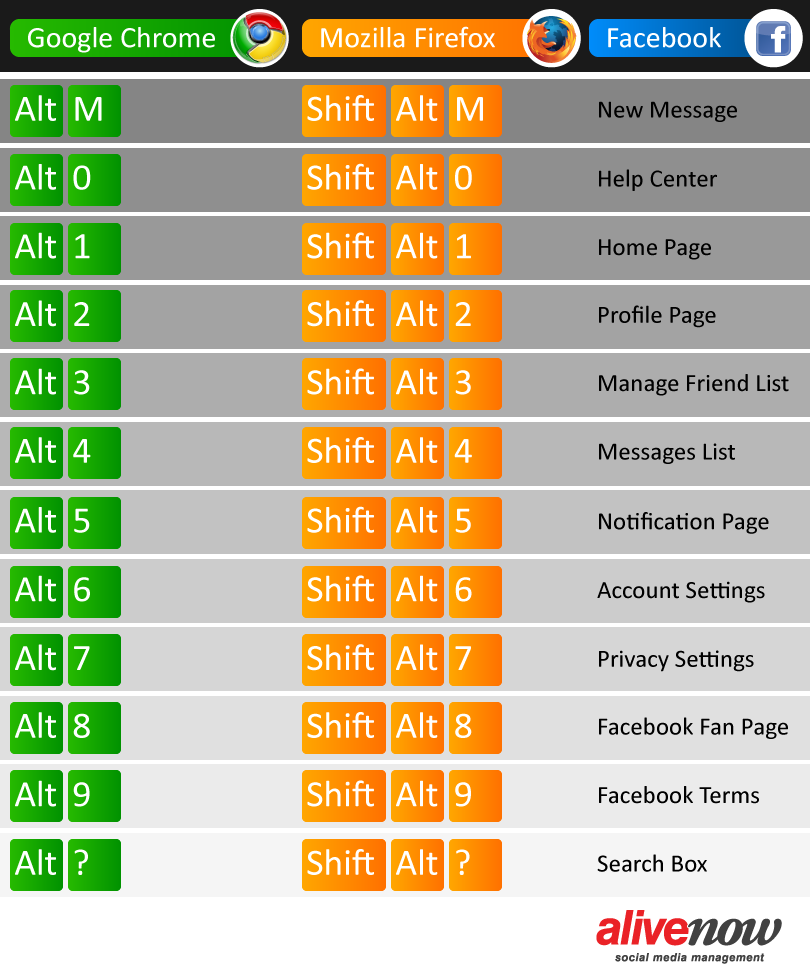
"ALT + 1" key combination will help you to reach your Facebook home page.
"ALT + 2" key combination can be used to view your profile.
"ALT + 3" key combination to confirm friend requests from your friends can enjoy.
"ALT + 4" key combination to reach the post quickly.
"ALT + 5" key combination to use to see all notifications.
on your keyboard
"ALT + 6" keys to the account settings, account settings, the easiest way to achieve fast you can reach.
"ALT + 7" hotkey Profile secrecy, friendship requests, search settings, privacy settings, all of them do. You can use the privacy settings.
"ALT + 8" key combination on Facebook in your profile may be outside of your Facebook page. Use your Facebook page to visit your profile.
"ALT + 9" key combination to know all you can use Facebook's terms and policies.

You even more in the future even more short cut keys to our followers on facebook'm paylaşaca you when we find or determine our ethics. Continue follow-up.

Facebook Emoticons

Facebook emoticons list is also helpful for those people who are not aware of meaning of emoticons. To use these Facebook smileys, all you need to do is use the Key combination as I explained below.


Wednesday, September 10, 2014

F8 Function Key Benefits


F8 key on the keyboard of the work that s what I used to open all the computer in Safe Mode I can hear you say. But when you read the rest of the summer you will learn the capabilities of the F8 key.


Using the F8 key word highlighting

Microsoft Office Word 'in all versions of the F8 is a handy little key:


  • When pressed twice, the cursor selects the word around 
  • Pressing three times selects the whole sentence 
  • when pressed four times to select the entire paragraph 
  • When pressed five times, it selects the entire document.

F8 Turns extend the computer on or off.

Expansion extended selection is displayed in the status bar in position and the arrow keys extend the selection. The F8 key when used with different, for example; SHIFT + F8 key, a non-adjacent cell or range of cells selected using the arrow keys allows you to add. CTRL + F8 keys, the workbook is not maximized, perform the Size command is.

Twitter Address; @selimzor


Thursday, September 4, 2014

Facebook Keyboard Shortcuts


Facebook the world's most popular of all time and the most successful social network. Facebook while providing the convenience of ease of keyboard shortcuts are not aware of. With keyboard shortcuts, and increases the speed of the mouse saves time, touching all too easy to Facebook, you can navigate.
Facebook Keyboard Shortcuts

Facebook to navigate through the website and Facebook messages for both shortcuts. Under all of the shortcuts in Mozilla Firefox, Google Chrome, and Internet explorer has been tested on the latest versions.

1. New Message;
Facebook friend to send a new message to “ALT+C” key combination you can use.

2. Inbox and Other Folding transition between;
People who are not on your friends list messages from the “Other” appears in the folder. Here, the message to “ALT+U” key combination you can use. “Other”from the folder “Inbox” to return to “ALT+I” key combination you can use.

3. Chat search;
Chat to your search for “ALT+G”, you can use the key combination.

4. Archiving Messages;
Facebook on any, you can archive a conversation. If you archive a message, just hides from the inbox and moves it to the archive folder. To start the archiving of the “ALT+Z” key combination you can use.

5. Mark The Message As Unread;
You are reading an unread message again to the “ALT+R” key combination you can use.

6. Marking a message As SPAM;
Messages sent to objectionable content and advertising that you think is spam, you can prevent checking. This too, “ALT+J” by using the key combination you can make.

tip: Facebook shortcut keys in a window, you can view all of. “ALT+Q” key combination, you can view.

Facebook keyboard shortcuts for Navigation

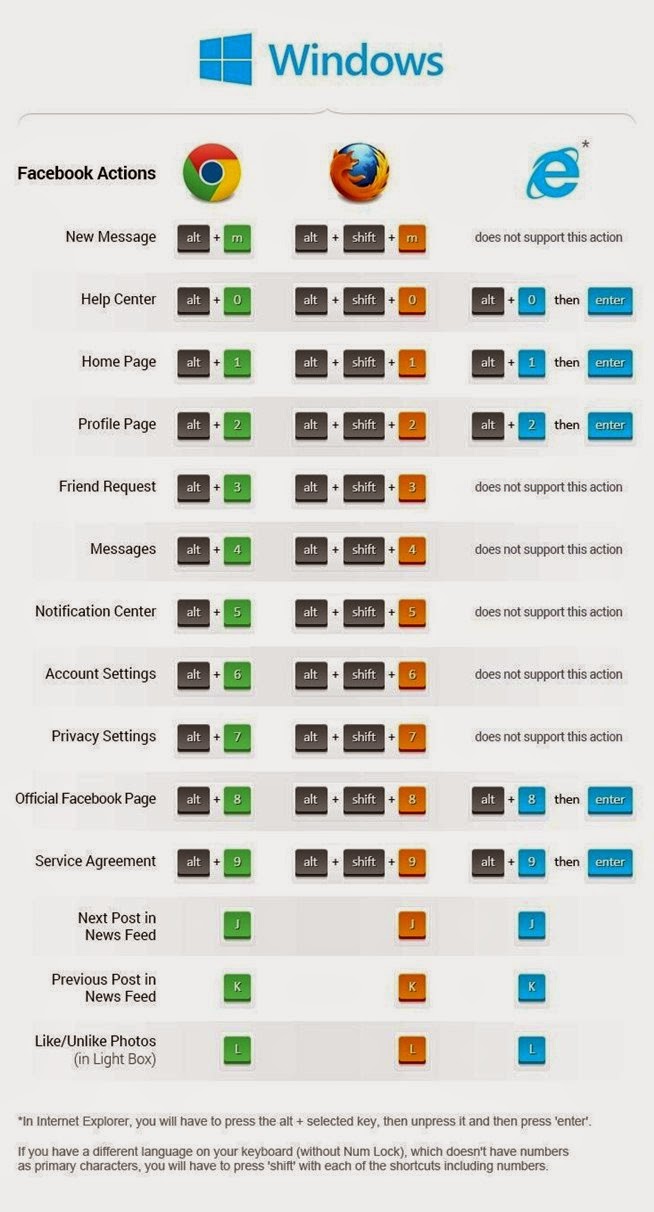
The following keyboard shortcuts that are listed in the browser from the browser changes. The first browser, and then the identifier for the shortcut keys.


Windows
Chrome: Alt+x
Firefox: Shift+Alt+x

Macintosh

Safari and Chrome: Control+Option+x
Firefox: Control+x

Note : where it says x to the values given in the topic by typing means that you will use.

1. Facebook Main Page;
"ALT+1" Key combination, Facebook can help you reach your home page.
2. Profile Page;
Your profile to view "ALT+2" key combination you can use.
3. New Confirm Friend Requests;
From your friends to confirm friend requests "ALT+3" key combination you can use.
4. Messages Go To;
Messages to the "ALT+4", use the key combination.
5. Notifications;
All notices to see the "ALT+5", use the key combination.
6. Account Settings;
Account settings is the easiest fastest way to reach your keyboard, "ALT+6" keys to the account settings you'll find.
7. Privacy Settings;
Profile privacy, friendship requests, call settings, all of them in the Privacy settings. Privacy settings ALT+7", you can use the shortcut key.
8. Facebook Page To Visit;
Facebook’ profile out of your Facebook page you may have. Your profile Facebook to visit your page and "ALT+8" use the key combination.
9. Facebook's Terms and Policies;
All Facebook terms and policies, to know the "ALT+9" key combination you can use.
Facebook Keyboard Shortcuts