Showing posts with label Shortcuts. Show all posts

Saturday, September 20, 2014

Twitter Keyboard Shortcuts


Twitter 'faster with keyboard shortcuts so we can use twitter. twitter users to be careful and do not use the twitter twitter us to use shortcuts actually very fast and allows us to save time.

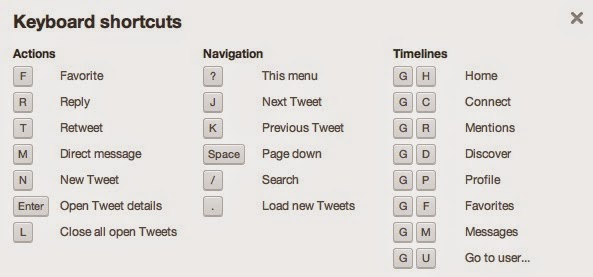
Qwerty keyboard shortcuts for devices Twitter

Qwerty keyboard on a smart phone, depending on the typing input language, some shortcuts might not be available. To reply to a direct message or tweet, to highlight the direct message or tweet. Press the R key.
All persons mentioned in a tweet to answer, highlight the tweet. Press the L button.
To re-publish a tweet, highlight the tweet. Press the F key.

Press C to create a tweet.
To create a direct message, on the Direct Messages screen, press the C key.
Tweet press the D key to refresh the timeline.
All persons mentioned in a tweet to answer, highlight the tweet. The question mark (?) Press.
To re-publish a tweet, highlight the tweet. Dot (.) Press.
To create a tweet comma (,) key.
To create a direct message, on the Direct Messages screen, comma (,) key.
To refresh tweet timeline, press 5.
Navigation shortcuts
Navigation shortcuts, full keyboard smart phone can be used.
To go to the Home screen, press the Alt key and press 0.
To go to the Home screen, press the Alt key and 1.
To go directly to the Messages screen, press the Alt key and 2.
About to go to the screen, press the Alt key and 3.
Trend of the screen to go to the Alt key and press 4.
Go to the search screen, press the Alt key and 5.
Go to the My Profile screen, press the Alt key and 6.
Smart phone with full keyboard to switch between Twitter accounts, press the Alt key and the Space key.

Site address; http://programsepetimiz.blogspot.com.tr/
E-mail address; programsepetimiz@gmail.com
Facebook address; https://www.facebook.com/programsepetimiz
Twitter address; @programsepeti ve @selimzor

Wednesday, September 10, 2014

F8 Function Key Benefits


F8 key on the keyboard of the work that s what I used to open all the computer in Safe Mode I can hear you say. But when you read the rest of the summer you will learn the capabilities of the F8 key.


Using the F8 key word highlighting

Microsoft Office Word 'in all versions of the F8 is a handy little key:


  • When pressed twice, the cursor selects the word around 
  • Pressing three times selects the whole sentence 
  • when pressed four times to select the entire paragraph 
  • When pressed five times, it selects the entire document.

F8 Turns extend the computer on or off.

Expansion extended selection is displayed in the status bar in position and the arrow keys extend the selection. The F8 key when used with different, for example; SHIFT + F8 key, a non-adjacent cell or range of cells selected using the arrow keys allows you to add. CTRL + F8 keys, the workbook is not maximized, perform the Size command is.

Twitter Address; @selimzor


Keyboard Shortcuts YouTube


Sometimes a large part of today we spend watching YouTube vide or listen to music. Youtube for you to use your time more effectively, we show the most useful shortcuts Youtube.

YouTube shortcuts


Do go full screen: F
Exit full screen: Esc
5 seconds to go Back: Left arrow key
Go forward 5 seconds: Right arrow key
10 seconds to go Back: Ctrl + Left arrow key
Skip forward 10 seconds: Ctrl + Right arrow key
Volume up: up arrow key
Sound off: down arrow key
TAB key Enter / Spacebar you can use the video features.

Thursday, September 4, 2014

Facebook Keyboard Shortcuts


Facebook the world's most popular of all time and the most successful social network. Facebook while providing the convenience of ease of keyboard shortcuts are not aware of. With keyboard shortcuts, and increases the speed of the mouse saves time, touching all too easy to Facebook, you can navigate.
Facebook Keyboard Shortcuts

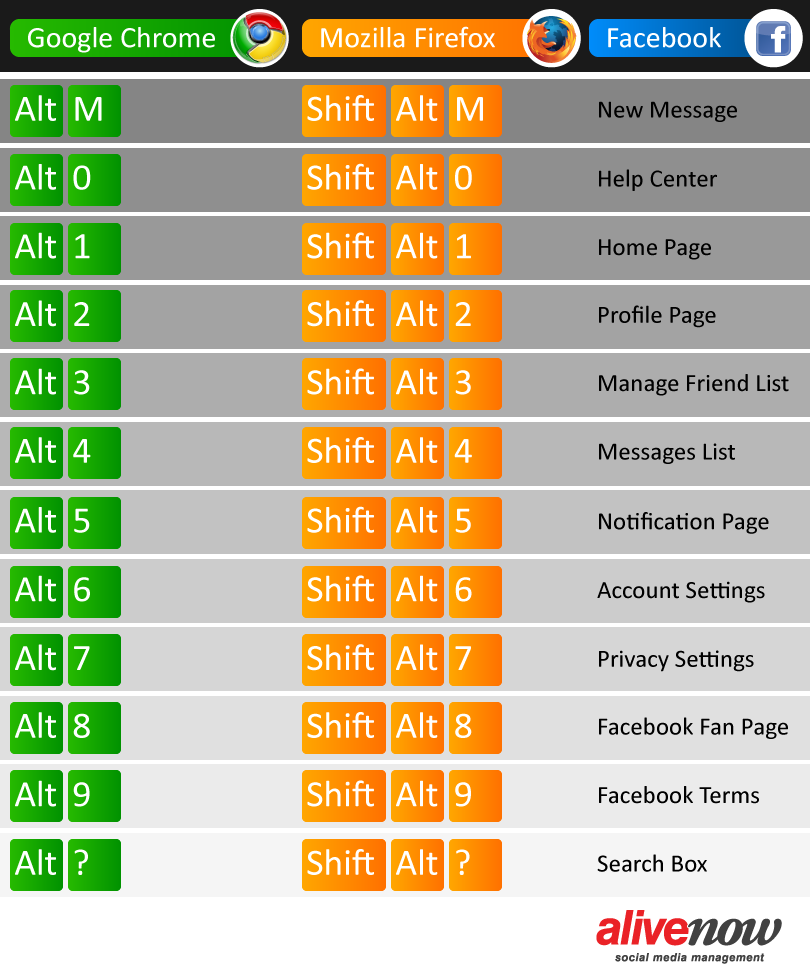
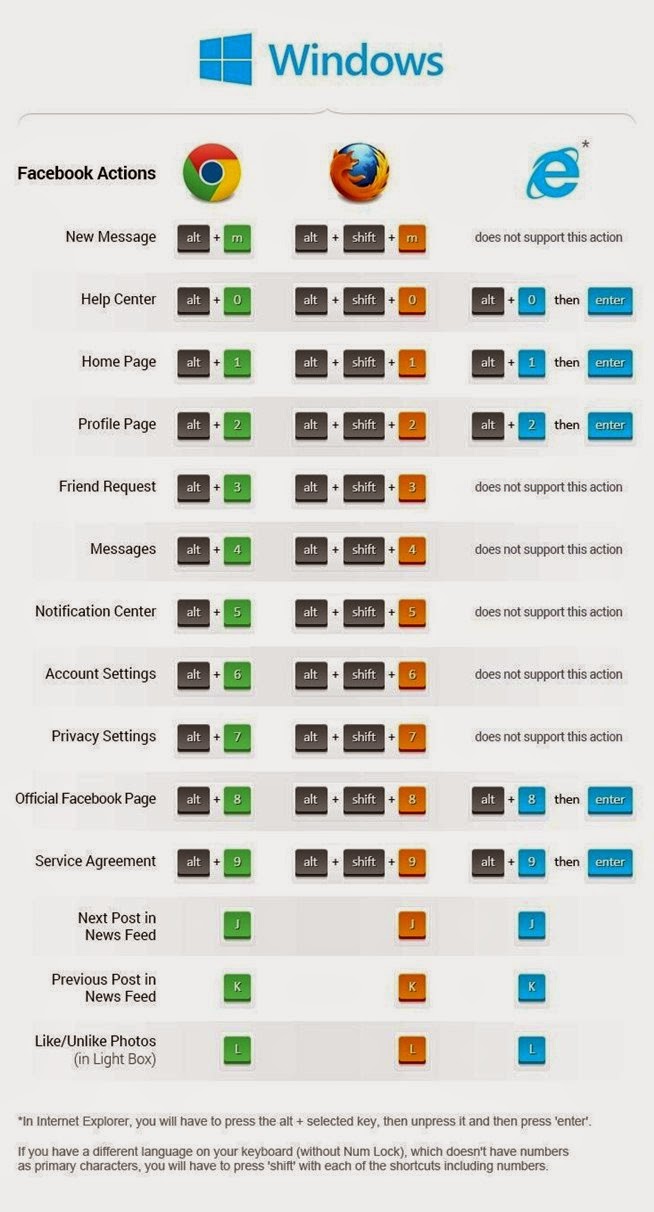
Facebook to navigate through the website and Facebook messages for both shortcuts. Under all of the shortcuts in Mozilla Firefox, Google Chrome, and Internet explorer has been tested on the latest versions.

1. New Message;
Facebook friend to send a new message to “ALT+C” key combination you can use.

2. Inbox and Other Folding transition between;
People who are not on your friends list messages from the “Other” appears in the folder. Here, the message to “ALT+U” key combination you can use. “Other”from the folder “Inbox” to return to “ALT+I” key combination you can use.

3. Chat search;
Chat to your search for “ALT+G”, you can use the key combination.

4. Archiving Messages;
Facebook on any, you can archive a conversation. If you archive a message, just hides from the inbox and moves it to the archive folder. To start the archiving of the “ALT+Z” key combination you can use.

5. Mark The Message As Unread;
You are reading an unread message again to the “ALT+R” key combination you can use.

6. Marking a message As SPAM;
Messages sent to objectionable content and advertising that you think is spam, you can prevent checking. This too, “ALT+J” by using the key combination you can make.

tip: Facebook shortcut keys in a window, you can view all of. “ALT+Q” key combination, you can view.

Facebook keyboard shortcuts for Navigation

The following keyboard shortcuts that are listed in the browser from the browser changes. The first browser, and then the identifier for the shortcut keys.


Windows
Chrome: Alt+x
Firefox: Shift+Alt+x

Macintosh

Safari and Chrome: Control+Option+x
Firefox: Control+x

Note : where it says x to the values given in the topic by typing means that you will use.

1. Facebook Main Page;
"ALT+1" Key combination, Facebook can help you reach your home page.
2. Profile Page;
Your profile to view "ALT+2" key combination you can use.
3. New Confirm Friend Requests;
From your friends to confirm friend requests "ALT+3" key combination you can use.
4. Messages Go To;
Messages to the "ALT+4", use the key combination.
5. Notifications;
All notices to see the "ALT+5", use the key combination.
6. Account Settings;
Account settings is the easiest fastest way to reach your keyboard, "ALT+6" keys to the account settings you'll find.
7. Privacy Settings;
Profile privacy, friendship requests, call settings, all of them in the Privacy settings. Privacy settings ALT+7", you can use the shortcut key.
8. Facebook Page To Visit;
Facebook’ profile out of your Facebook page you may have. Your profile Facebook to visit your page and "ALT+8" use the key combination.
9. Facebook's Terms and Policies;
All Facebook terms and policies, to know the "ALT+9" key combination you can use.
Facebook Keyboard Shortcuts