Showing posts with label iPhone. Show all posts

Saturday, October 4, 2014

how to change dns settings on iphone and ipad


how to change dns settings on iphone

Banned from iPhone and iPad to enter the sites that you need to change the DNS settings let me explain how. Banned from iPhone and iPad to enter the sites unscheduled how to change the DNS settings for iOS and try to explain.
from iPhone and iPad devices, some sites are unable to. For example, "YouTube, Twitter" like sites. Making changes to DNS solutions can have access to banned sites. From now on the iPhone and iPad by following the steps below you can enter to enter the site you want.

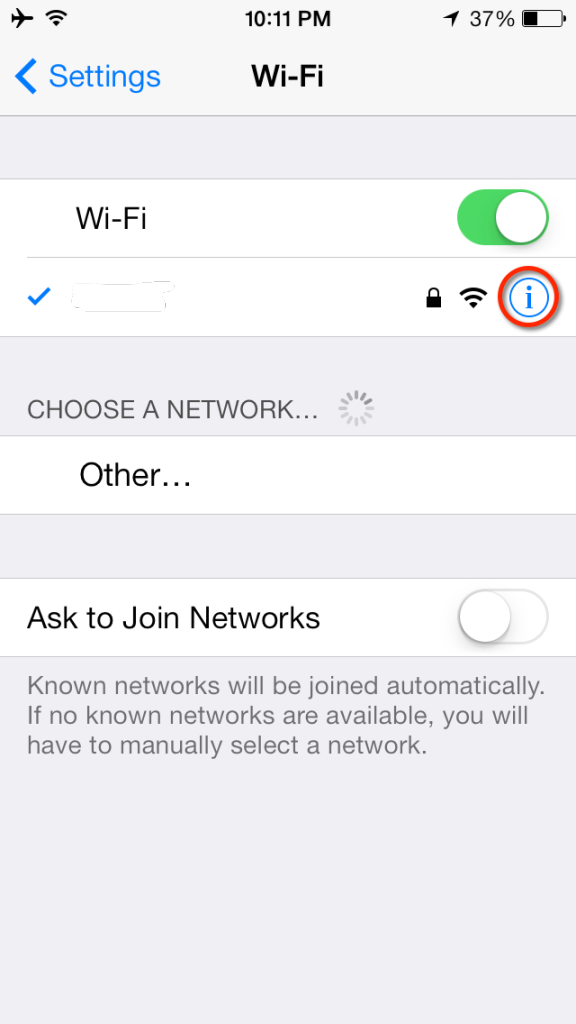
iPhone and iPad from the Settings menu, select Wi-Fi. Modem that is connected to the Internet information on the arrow next to the blue '>' click on the icon.


Here's how to change your iPhone's DNS servers:


From the iPhone's home screen, tap Settings.

Tap Wi-Fi. The screen shown below appears. The available wireless networks in range of your iPhone appear, as shown below.


Find your wireless network in the list, and then click the arrow. The screen shown below appears.


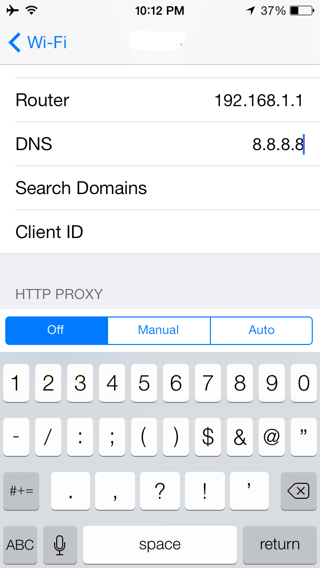
 Tap the DNS field.

Delete the current DNS servers, and enter the new DNS servers. (If you enter more than one DNS server, be sure sure to separate the servers with commas.)

To use OpenDNS, enter 208.67.222.222 and 208.67.220.220
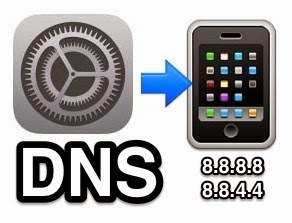
To use Google DNS, enter 8.8.8.8 and 8.8.4.4

dns Replacement iPhone 5, change dns ios, iPhone Configuration for OpenDNS, How to change your DNS on Iphone/Ipad/Ipod, How to Change Your iPhone's DNS Servers


Web address; http://programsepetimiz.blogspot.com.tr/
E-mail address; programsepetimiz@gmail.com
Facebook address; https://www.facebook.com/programsepetimiz
Twitter address; @programsepeti ve @selimzor
Friday, September 19, 2014

iPhone 6 Plus Format and Reset


Phone devices that deletion of the data you think? Do you want to permanently delete files? By resetting the device of all data and settings you want to get rid of? Perform the steps in our article, then smoothly and reset your device.

1. Method
Home + On / Off button and hold for 15 seconds.
Your device has been reset.

2. Method

iPhone 6 Plus Format

When a virus infects your phone iPhone 6 Plus, when slowed down, settings, etc. If you experience difficulties in throw formats, to restore the factory settings will be the best option for you. Resetting to factory settings, as well as the applications you download and install your media files, your data, including your customized settings will permanently delete everything in the phone memory. Before resetting to factory settings, make sure to back up your data and files.

Rotate iPhone to factory settings 6 Plus

Complete iPhone before you start your process are closing.
First of all, in closed position, open iTunes on your computer.
Home button (the round button) and hold while Plug the USB cable. Screen will appear.
After detecting your phone from iTunes Recovery Mode screen (restore) fully completed, wait until after you click process.

reset certain features iPhone 6 Plus

Word dictionary, network settings, you can reset the home screen layout and location settings. At all of your content and settings
You can delete.
iPhone 6 Plus erase all content and settings: Settings> General> Reset and then go to the Erase All Content and Settings, tap.
iPhone 6 Plus after you confirm that you want to reset all content, information and settings will be deleted.
iPhone can not be used again until you have set.
iPhone 6 Plus reset all settings: Settings> General> Reset Scroll to and tap Reset All Settings.
All your preferences and settings are reset.

iPhone 6 Plus reset the network settings: Settings> General> Reset Scroll to and tap Reset Network Settings.
When you reset network settings, a list of previously used networks and VPN settings not installed by a configuration profile will be deleted. Wi-Fi network that is connected with restarts and you will be disconnected. Wi-Fi and "Ask to Join Networks" settings remain open.
VPN settings installed by a configuration profile to delete,
Settings> General> Profile, go to Select and then tap Delete profile. This process provided by the profile in other settings, or delete accounts.
Resetting the keyboard dictionary: Settings> General> Reset Keyboard Dictionary Scroll to and tap the Reset button.
When writing to the keyboard dictionary by rejecting words iPhone suggests as you can add words. Word to reject the correction and add the word to the dictionary, tap the keyboard. Resetting the keyboard dictionary add, delete all of the words.

Resetting the iPhone 6 Plus Home screen layout: Settings> General> Reset Home Screen Layout section, scroll to and tap the Reset button.
iPhone 6 Plus reset location warnings: Settings> General> Reset Location Warnings Reset Scroll to and touch.
Location alerts, application requests are made ​​by using Location Services. iPhone application for wanting to use Location Services application in the first offers a location for the warning. If you tap Cancel in response to the request will not be offered any more. For each application in order to request to reset location warnings, tap Reset Location Warnings.

apple factory settings

Site address; http://programsepetimiz.blogspot.com.tr/
E-mail address; programsepetimiz@gmail.com
Facebook address; https://www.facebook.com/programsepetimiz
Twitter address; @programsepeti ve @selimzor

Thursday, September 18, 2014

iPhone 6 Format, Throwing, Throwing Reset and Reset


iPhone throwing six formats

How to Factory Reset an iPhone 6

1. Method
Home + On / Off button and hold for 15 seconds.
Your device has been reset.

2. Method

iPhone 6 When a virus infects your phone, when slowed down, settings, etc. If you experience difficulties in throw formats, to restore the factory settings will be the best option for you. Resetting to factory settings, as well as the applications you download and install your media files, your data, including your customized settings will permanently delete everything in the phone memory. Before resetting to factory settings, be sure to back up your data and files.

Rotate iPhone to factory settings 6

Complete iPhone before you start your process are closing.
First of all, in closed position, open iTunes on your computer.
Home button (the round button) and hold while Plug the USB cable. Screen will appear.
After detecting your phone from iTunes Recovery Mode screen (restore) fully completed, wait until after you click process.

iPhone 6 to reset certain features

Word dictionary, network settings, you can reset the home screen layout and location settings. At all of your content and settings
You can delete.
iPhone 6 erase all content and settings: Settings> General> Reset and then go to the Erase All Content and Settings, tap.
iPhone 6 After confirming that you want to reset all content, information and settings will be deleted.
iPhone can not be used again until you have set.
iPhone 6 reset all settings: Settings> General> Reset and Reset All Settings, go to the tap.
All your preferences and settings are reset.

iPhone 6 reset the network settings: Settings> General> Reset Network Settings section, scroll to and tap the Reset button.
When you reset network settings, a list of previously used networks and VPN settings not installed by a configuration profile will be deleted. Wi-Fi network that is connected with restarts and you will be disconnected. Wi-Fi and "Ask to Join Networks" settings remain open.
VPN settings installed by a configuration profile to delete,
Settings> General> Profile, go to Select and then tap Delete profile. This process provided by the profile in other settings, or delete accounts.

Resetting the keyboard dictionary: Settings> General> Reset Keyboard Dictionary Scroll to and tap the Reset button.
When writing to the keyboard dictionary by rejecting words iPhone suggests as you can add words. Word to reject the correction and add the word to the dictionary, tap the keyboard. Resetting the keyboard dictionary add, delete all of the words.
iPhone 6 Resetting the Home screen layout: Settings> General> Reset Home Screen Layout section, go to tap the Reset button.

iPhone 6 reset location warnings: Settings> General> Reset Location Warnings Reset Scroll to and touch.
Location alerts, application requests are made ​​by using Location Services. iPhone application for wanting to use Location Services application in the first offers a location for the warning. If you tap Cancel in response to the request will not be offered any more. For each application in order to request to reset location warnings, tap Reset Location Warnings.

 How to Factory Reset an iPhone

Site address; http://programsepetimiz.blogspot.com.tr/
E-mail address; programsepetimiz@gmail.com
Facebook address; https://www.facebook.com/programsepetimiz
Twitter address; @programsepeti ve @selimzor